Eclipse: Sliding Panel Sign-In & Sign-Up

Two React authentication screens where a bold colour panel slides across to swap login and sign-up forms: a diagonal-sweep version and a dark neon-glow version.
Try it live
The real demo, running in a sandbox. Switch the screen size to see how it adapts.
About this item
The sliding-panel login is a proven pattern: one card, two forms, and a welcome panel that glides across to switch between them. Eclipse delivers two polished takes on it for React, so returning users and newcomers both land in the right place without a page load.
Diagonal Sweep
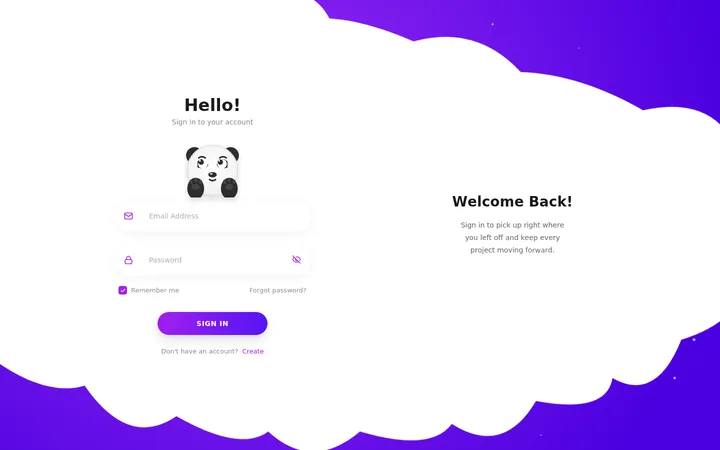
Built with Framer Motion: a diagonal colour panel sweeps across the stage while the forms exit and enter with staggered field animations. Inputs use floating labels and inline icons.
Neon Glow
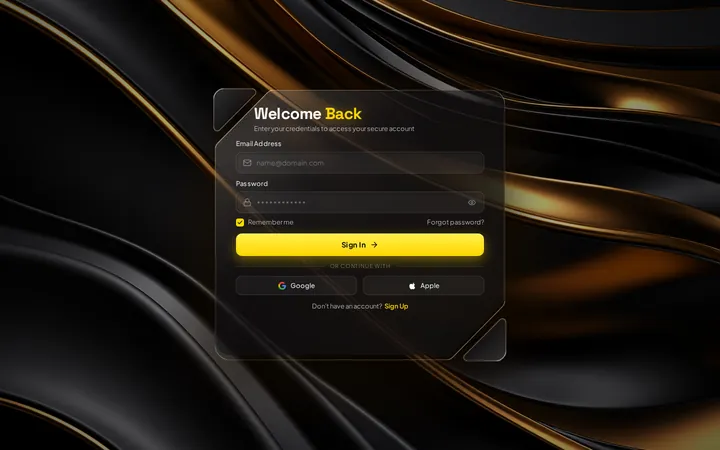
A pure-CSS take with a rotating neon border, animated light sparks running along decorative lines, glowing input underlines and a shine sweep on the button. Uses Lucide icons, no animation library.
Variants included
- Diagonal Sweep: A diagonal colour panel sweeps across the screen as the login and sign-up forms trade places, with floating labels and staggered motion.
- Neon Glow: Dark card wrapped in a rotating neon border, with flowing light lines and a sliding "Welcome back / Hello, friend" overlay.
Features
- ✓Two complete login / sign-up variants
- ✓Animated panel that swaps the forms without a page load
- ✓"Welcome back" and "Hello, friend" call-to-action panels
- ✓Login: username and password; sign-up: username, email and password
- ✓Floating labels and inline SVG icons (Diagonal Sweep)
- ✓Framer Motion staggered field animations (Diagonal Sweep)
- ✓Rotating neon border glow and flowing light lines (Neon Glow)
- ✓Button shine sweep and glowing input focus states (Neon Glow)
- ✓Forgot-password link and mode-switch links
What's included
Full JavaScript source code for 2 variants,package.jsonwith locked dependencies, Vite config, RVT.ai README with setup and customisation guide,LICENSEandTHIRD-PARTY-NOTICES.md. Nonode_modules: runnpm installonce.
Requirements
Node.js 20.19+ and npm 10+ to develop and build. The production build is static HTML, CSS and JavaScript that runs on any static host. No backend, API keys or paid services required.
Perfect for
- SaaS and web-app authentication
- Gaming and community sign-ups
- Member areas and dashboards
- Student and portfolio projects
From download to production
- Download Eclipse: Sliding Panel Sign-In & Sign-Up from your account and unzip it.
- Run
npm install, thennpm run devto open it locally. - Swap in your brand colours, copy and data (see the README customisation guide).
- Run
npm run buildand deploy thedist/folder to any static host.
Support and updates
Includes free updates and six months of RVT.ai support. Ask pre-purchase questions in the product Q&A, or open a ticket at https://rvt.ai/support with your order number.
Choose the license for your project
A Regular license covers a single end product that is not sold to end users. Choose Extended for a single end product that is sold to end users, including SaaS products and paid applications. Review the full license terms before checkout.
Features
- Two complete login / sign-up variants
- Animated panel that swaps the forms without a page load
- "Welcome back" and "Hello, friend" call-to-action panels
- Login: username and password; sign-up: username, email and password
- Floating labels and inline SVG icons (Diagonal Sweep)
- Framer Motion staggered field animations (Diagonal Sweep)
- Rotating neon border glow and flowing light lines (Neon Glow)
- Button shine sweep and glowing input focus states (Neon Glow)
- Forgot-password link and mode-switch links
Files included
- Full source code (React + Vite)
- README.md
- LICENSE (RVT.ai)
- THIRD-PARTY-NOTICES.md
- package.json + package-lock.json
Version 1.1.0 and changelog
Version 1.1.0
Fully responsive phone and tablet layouts
Version 1.0.0
Initial RVT.ai release. Includes Diagonal Sweep, Neon Glow.